Showing posts sorted by relevance for query networking. Sort by date Show all posts

Friday, September 27, 2013

Digital Signage How To: Networking Basics


-Scott Hofheins


The invention of the computer changed the way we see and interact with the world forever. Likewise, networking these computers together changed their very definition. It lets them work together like a single organism powering the internet, cloud applications, email, commerce, Youtube, Google...you name it.


The sign industry is no exception. We’ve gone from basic serial communication, to high speed 4G Cellular modems on full color digital billboard networks. Knowing how computers and networks function, even on a basic level is a worthwhile goal for anyone in the industry. My intention is to keep this as simple as possible, while still providing an accurate picture of how it all works.


Network Neighborhood
These days a computer can be anything: cellphones, laptops, desktops, signs, even cars! Networks are a collection of these devices organized into virtual neighborhoods in a virtual world. Just like us, these devices share information, maintain their ‘home’, and communicate with others across the globe. They have laws and standards that they must abide by, or the system can break. We call the most fundamental law TCP/IP and is the final word in whether or not devices can communicate with the others.
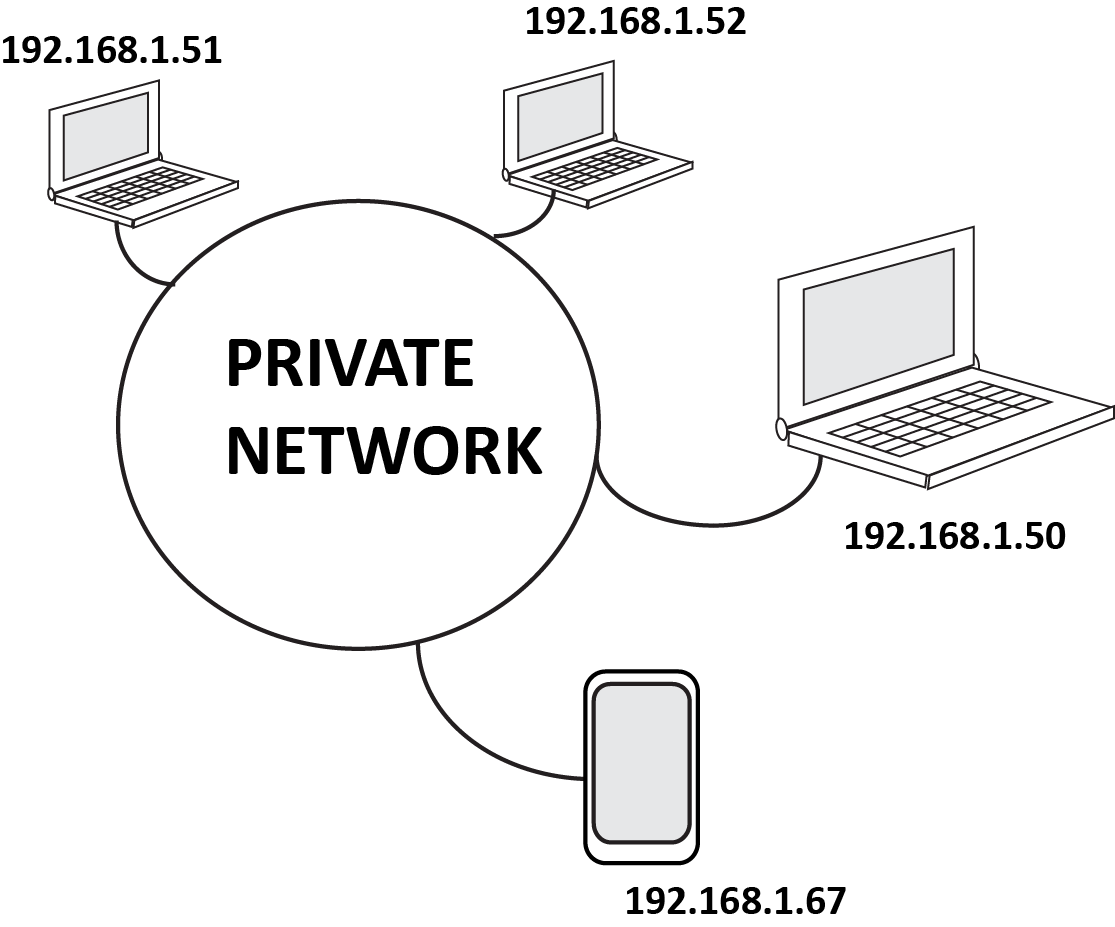


Addresses
Just like your house, these devices must have registered addresses according to TCP/IP rules. The address and other settings will look something like this:

  • IP Address: 192.168.1.50 (your actual address)
  • Subnet: 255.255.255.0 (the limitations of your address)
  • Gateway: 192.168.1.1 (the address of the gateway to the internet)
  • DNS #1: 192.168.1.1 (the address of your phone book)
  • DNS #2: 8.8.8.8 (your backup phonebook)
Because everything is automated in this virtual world, devices cannot communicate over the network without an address. The mail man might show up, but if there is no number on a house he will run away confused, and usually drop your packet in the process. He doesn't even knock on the door.


Organization and Keeping the Peace
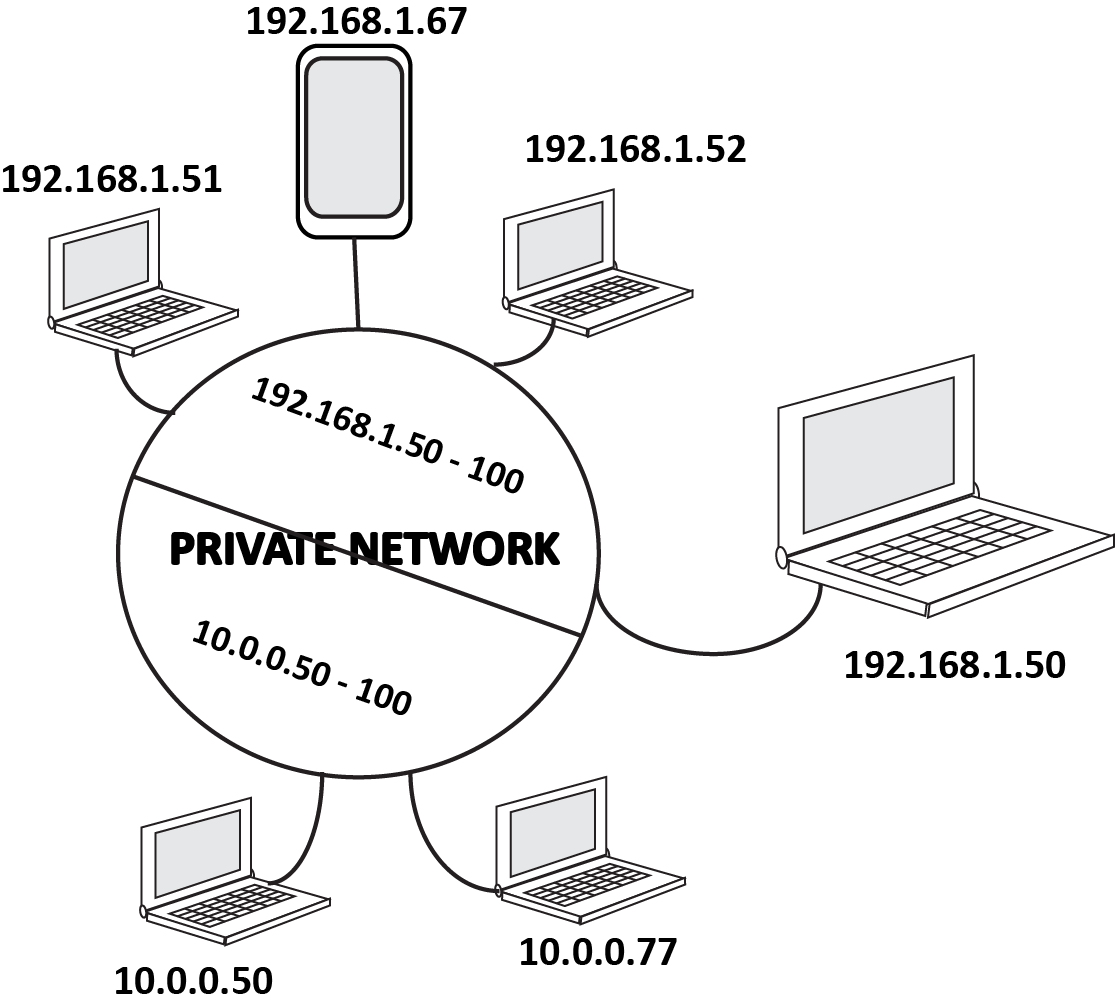
To avoid miscommunication and provide standard design structures for our private networks, TCP/IP tells us that our devices cannot communicate with another device unless it they both have addresses within a designated range. This is important for security and organization. You may not want the Hatfield area talking to the McCoys, it could get ugly. So you setup your Hatfield devices on a range of 192.168.1.50 thru 100, and your Mccoys on a range of 10.0.0.50 thru 10.0.0.100. This way, they still live in the same network without causing any issues.


Public and Private
Because this entire virtual world is governed by a strict numerical government, there is a limited number of addresses available. To minimize this problem, they have separated the world into Private Networks, and Public Networks. Private Networks have a smaller number of addresses they can use legally, at their leisure.  The Public Network has all the rest of the addresses, governed by the almighty ICANN. They keep a record of all public addresses and who they are assigned too. All communication between Private and Public networks rely on this record.
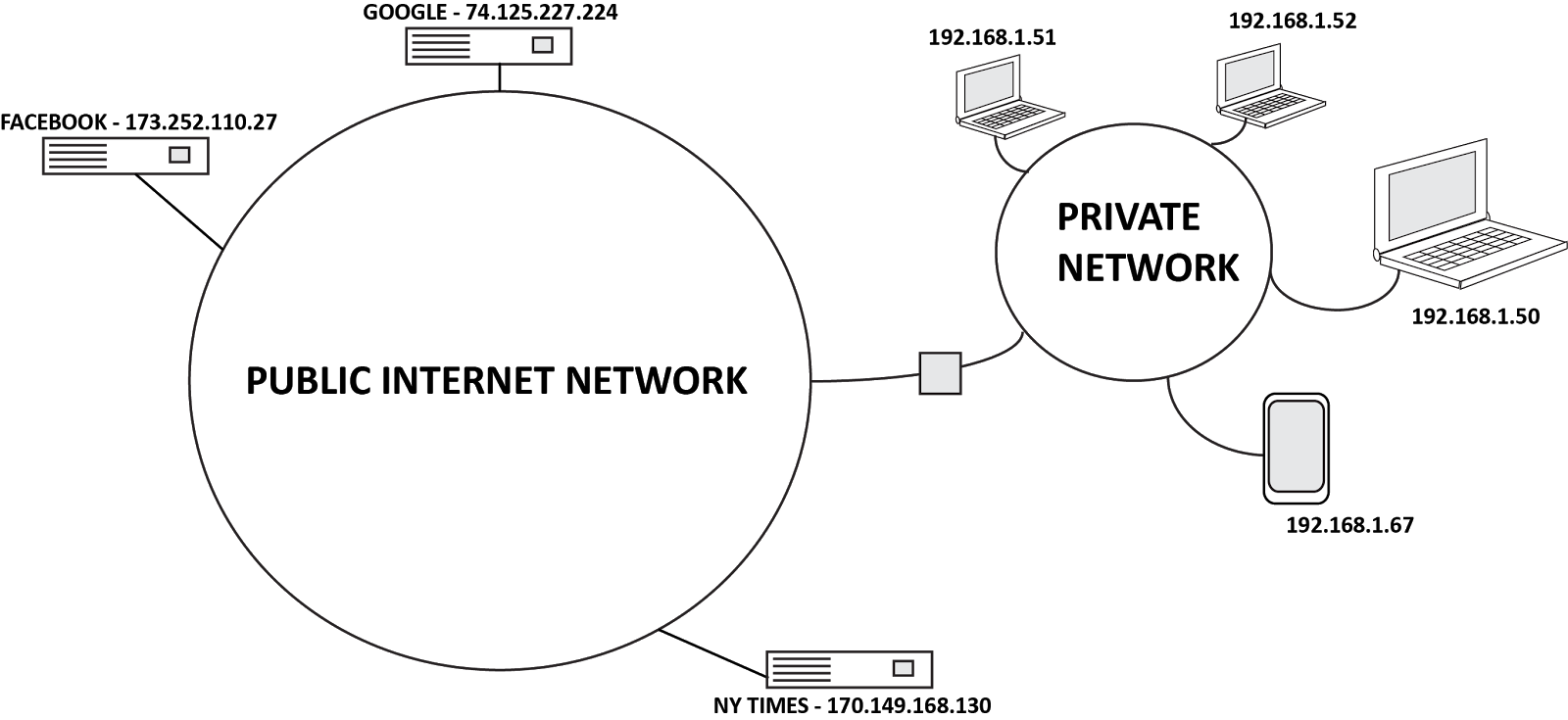


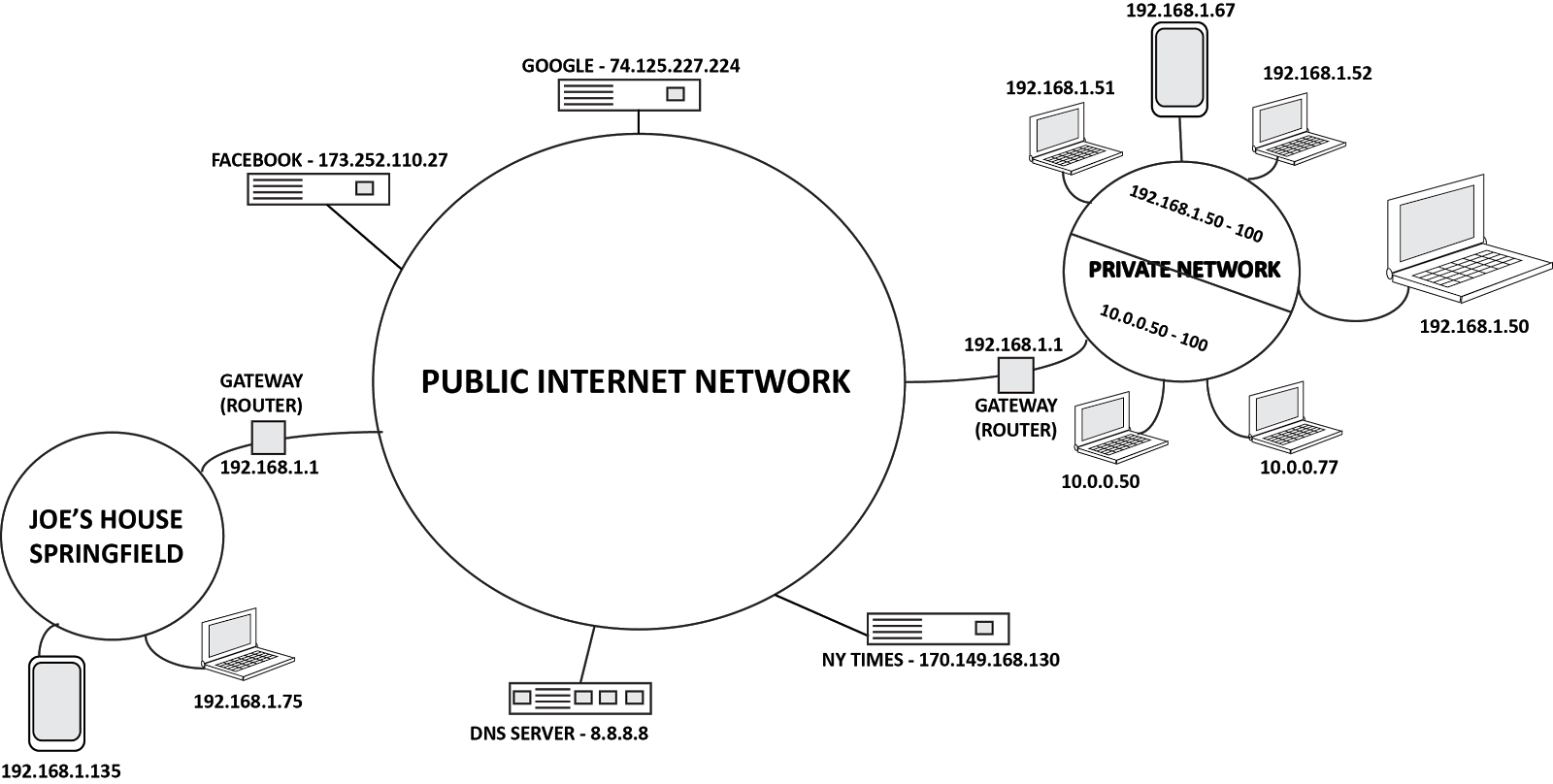
Private address numbers can be duplicated, as long as the duplicate numbers aren't in the same network. The mail labeled 1600 Pennsylvania in Springfield MO, will not go to the White House at 1600 Pennsylvania in Washington DC because they are in different "neighborhood". This is why it’s important that Public Addresses cannot be duplicated number for number, because they are in a single neighborhood we call “The Internet”.


Gated Communities
So how do we communicate with the public addresses like Google, or Facebook? Or across the internet, to email our grandma? Well it’s all about The Gateway. Every private network that wants to communicate to the outside world (or in some cases a larger internal network) must have a Gateway to these places. This is a device like a router, that will direct your devices communications back and forth correctly, over the internet. In other words, the gateway is the device that labels your communication for 1600 Penn in Springfield, MO...not Washington DC.

The Phone Book
Numbers are great, but not so easy to remember. You really don’t want to have to type in 74.125.227.224 to get to Google right? So we have DNS, or Domain Name Servers. These devices keep track of who’s name, is associated with what number. So when you type google.com, the DNS server looks up the number for that name, and sends you to the right place. Usually your Gateway (Router) will communicate directly with the DNS servers online, (this is why in a typical home network your Gateway address and DNS address are the same).


The Basics
It seems complicated at first, but when you really lay it out and look at the basics, it starts to make sense. Just remember these key points.
  • Every device must have an IP address to access the network.
  • To communicate with other devices, the addresses for each device must be in the same range.
  • Devices access the internet through a Gateway. If you do not provide a Gateway address for the device, it can still communicate to your private network, but no further.
  • The DNS server is your phone book, it looks up the numerical IP address associated with the name you typed into the browser and sends you to the right place.
-SH


I hope this post has been informative and helpful. As usual, I welcome ALL constructive comments. Please feel free to comment and add anything I’ve missed, or additional tips you may have regarding this topic. Please visit www.vantageled.com for many other resources, white papers, and of course: Great looking LED Signs!


**All posts/thoughts/writings are strictly the viewpoint of me and me alone and do not reflect nor speak for Vantage LED’s beliefs, attitudes, thoughts, etc. unless specifically stated.

Wednesday, May 7, 2014

Digital Signage 101:Make sure you have the right tools for DS!

-Deacon Wardlow
The right tool is incredibly important and (unfortunately) there's rarely one tool to fix everything. Search for "digital signage tools" and a load of software and other options come up, but not much in the way of practical equipment to "get 'er done" when installing and/or servicing a Digital Signage system.

I get a lot of people asking me what the "go to" tool set is for Digital Signage and (to save a lot of repetition and help others) here's my general set of must-haves when I go to work on Digital Signage (whether it's an LED Sign, LCD interior, or other). This list is by no means exhaustive (and if you have something which would be helpful, drop me a line and I'll update the blog):

Tool Bag 
Should be about duffel bag size, wheels are a bonus - I've been locations where I've had to haul my tools to multiple locations at a single site and walked a few miles (total) and wheels are definitely a bonus on a day like that...

Power Tools
Mostly drill (impact or other) with (at least) 4 fully charged batteries and a charger - it's somewhat personal preference whether you go with Hilti, Milwaukee, Ryobi, or something else - the more expensive tools are worth the extra cash... A reciprocating saws-all can come in handy more often than you'd think... Metal and wood blades should be carried...

Flexible Drive Shaft Extension
This is for your power drill, having a flexible drive shaft extension gets the power in weird angle spots where nothing else will fit. Get this or resolve yourself to repetitive stress injury on your wrist...

Bits 
(drill, allen, hex, get a multi-set for any situation) - you're going to lose them, buy a couple sets...

1/4" driver socket set (I'm American, so I avoid Metrics like the plague...)
I'm not sure how people get things in tight spaces, but this one tool has helped me immensely

General Tools (68 piece or better screwdriver set with ratcheting option)
You can buy kits for relatively low cost. The "three tool rule" generally applies to DS (Phillips, Flat Head Screw driver, Allen Wrench). Throw in a hammer, wrench, pliers (needle nose and oher), and you'll likely be in decent shape. Make sure your tools have a ratcheting option to save a lot of wrist work.

Power Meter/logger
I prefer the Fluke VR1710 - it's (literally) plug and play and excellent for most LED Sign power metering (more times than not, this meter has saved me and clients severe headaches and forced the public utility to fix power issues at a site which would have eventually "mysteriously" damaged an otherwise great LED Sign installation). Interior systems don't typically pull as much power as an outdoor LED Sign, it's always good to know how "clean" your power source is...

Voltage Meter
Great for checking power in/out.

Laptop Computer
Windows-based (it's generally compatible with most systems). Install any software from manufacturers you use or have an account for the sign available. VNC is a bonus (to remote into controllers). Make sure to include Cat 5 or 6 ethernet cable (terminated - 6' length and 100' length), power adapter, 4 port Intellinet (or other) ethernet switch, power strip, and backup battery. Having a laptop on hand will help you (and the tech support you're calling from a site) work past networking issues and get immediate access to a system which may need a little tweaking to integrate on a network which suddenly changed overnight when the IT person for the client decided to upgrade everything the day before you installed the LED Sign and/or the interior Digital Signage systems... You don't have to be a "hacker" just having a laptop is very helpful to the tech support person on the other side of the phone...

Ethernet Kit
1,000' spool of ethernet cable, termination ends, and a crimper w/stripper tool (ethernet cable is relatively simple to terminate).

Velcro and VHB
Velcro (dual-lock and/or tri-lock) and VHB (very high bond) tape helps put stuff in their place and keep them there.

Misc. cables and wirenuts
Different gauges of power wires, wirenuts (different sizes) and the stripper tool for quick fix on cables in a display.

Thermal Temp Sensor
Very helpful with LED and interior LCD systems to gauge the heat of a room, LED Display, and check wires to see where a particular wire might be hot.

THE ESSENTIALS
Electrical tape, duct tape, and WD-40 (what do these three things NOT fix?)

Mobile Phone and/or MiFi (cellular modem/wireless internet hotspot)
Smartphone is best, especially if you can use it as a hotspot. If the phone can't be a hotspot - a cellular modem/MiFi is great. Bring a USB wifi adapter so you can put the sign controller on wireless through your hotspot for a quick connect if there's a need to bypass the local network for testing communications to a display...

Soldering Iron (butane) w/solder wick and solder
This isn't a "must have" but there've been many times where it's easier for me to solder a connection in the field to fix something I'd otherwise have to wait a week or more for to replace... even if only as a stop-gap (temporary fix), this can be a very valuable tool.

Flashlight
Ideally a handheld is useful, but a headlamp (or even better, safety goggle mounted LED lights) are really helpful as many locations require install & service work be done outside of regular hours and chances are good there won't be a nice bright source of light to work from unless you supply it yourself.

Multitool
I use a Gerber, Leatherman is also awesome and incredibly useful for quick work. Whatever multi-tool you choose, don't go cheap. The cheap stuff will break on you when you most need it and that does not make for a good day...

Phone Numbers!
The go-to techs from a manufacturer (get their direct lines if you can), client contact info, basically the phone numbers (and emails) of anyone you might need to speak with when going out to a site.

Keys to the Kingdom
If installing a system which requires a special lock, please make sure the client tags the keys and gives them to someone who can be available outside of regular hours...

Please comment here or send questions or requests for information to deacon@vantageled.com. Vantage LED has white paper resources and more educational material on the website (http://www.vantageled.com), please check it out when you have a moment. Note all posts/thoughts/writings are strictly the viewpoint of me and me alone and do not reflect nor speak for Vantage LED’s beliefs, attitudes, thoughts, etc. unless specifically noted.attitudes, thoughts, etc. unless specifically noted.

Wednesday, November 13, 2013

Digital Signage Need to Know: Isn't "The Cloud" the Same as Wireless Connectivity?


Isn't "The Cloud" the same as "Wireless" connectivity?

Let's lay this interesting misconception out and discuss how the two concepts are related (or not). A definition fresh from the Mirriam-Webster dictionary, of the World Wide Web opens the topic:

Definition of WORLD WIDE WEB-
: a part of the Internet accessed through a graphical user interface and containing documents often connected by hyperlinks, also called the Web

And the definition of INTERNET-
:  an electronic communications network that connects computer networks and organizational computer facilities around the world

The Web is a part of the Internet.  There are other parts of the Internet and the most well known are:

FTP and Gopher Sites
Communication Programs
Newsgroups
Chat Rooms
Social Networking

Definition of THE CLOUD-
: anything that involves delivering hosted services over the Internet

So, The Cloud, as it were, is really a process, or a service.

Think of it in terms of the early days of personal computing (which extended up until a few years ago). You are a wheat farmer in Kansas and you use a service that predicts the weather, estimates the cost of the wheat at market, provides technical assistance and allows you to talk to other wheat farmers on-line. You pay $50 per month for this service and they send your CDs out whenever they update the software- let's call this service Wheat-Max.

The nice people at Wheat-Max just upgraded their software so the introduction screen is prettier and the cost per bushel estimator for International shipments is running real time. They sent out the new update to your farm last week and your wife dropped the CD on your desk this afternoon.

Now, you have your desktop fired up and insert the upgrade disc into the DVD/CD reader on your computer hoping everything runs smoothly from a technical perspective, while keeping an eye on that approaching thunderstorm (would hate to lose power 1/2 way through the upgrade) and not wanting to miss your dinner. Twenty minutes later an error code is displayed to your screen that says "insufficient RAM: process aborted". 

Hasn't this happened to you? Well maybe not the Wheat-Max upgrade, but my point is why do we manage our software this way? Why didn't Wheat-Max just upgrade their software on-line, then after dinner you could sign on and just use the software?

The same concept holds true for LED sign software. How many LED sign companies open up their newly arrived LED sign project, remove the LED cabinets, set it up in their shop and look for the CD to make it all work!  Whoopsie- they did not ship the CDs with the LED display!

Let's not play that game. Let the LED manufacturer do the work. You, the LED sign company, have enough to worry about finding new customers and sealing the deal. You don't need the headaches of trying to run a data processing center too.

So, the Internet is the network of computers, the World Wide Web is part of the Internet, and The Cloud is just a cool name for accessing and using the software on some other company's computer so you don't have to have your dinner missed updating the program with yet another revision.

But the question was: Isn't "The Cloud" the Same as Wireless Connectivity? Clearly it is not the same. Wireless connectivity allows a user to communicate to an LED display (for example) remotely but the controlling software may be on their PC. With Cloud control the software is resident on the computer of the LED manufacturer. To make it even less clear- when using the cloud software to control your LED display it communicates remotely (wireless). You just don't have to fool around maintaining the software because it's on a remote computer online.

It works... its great... get into THE CLOUD!

These comments belong to me, Mike Prongue, and do not reflect the views, opinions, hopes or dreams of anyone else, anywhere else and this includes Vantage LED. I appreciate your constructive opinion which may be sent to me at michael@vantageled.com. 


Tuesday, February 12, 2013

Digital Signage "Need To Know": Educate yourself and your clients, before the competition does it for you!

-Deacon Wardlow


One of the great things about childhood, nobody expects a child to know things. We accept a child is generally ignorant of the world and things which are contained within it. A child can walk around blissfully unaware of anything and everything and people (generally) take extra efforts to help children learn and overcome their ignorance of things. It’s harder being an adult. At some point, between childhood and adulthood, ignorance isn’t acceptable anymore and it’s quite embarrassing to be caught off-guard. Why? What happened along the way?

Richard Feynman (a great philosopher, physicist and human being) was entranced by the unknown. He saw it as a personal challenge to explore and discover things. Feynman was amongst the mental giants of our history and he openly admitted to ignorance and the joy discovery can bring. The difference between childhood and adulthood is choice and knowledge. People are often afraid to admit ignorance because they don’t want to appear “lesser” in other’s eyes. Unfortunately this means we sometimes won’t admit to ourselves when we need to knuckle-down and bear into a new subject to overcome a lack of knowledge and familiarity. As a child, we didn't have as great a fear of failure. 'Can't' wasn't part of the child's vocabulary until someone taught it to them. We have to step up and reclaim the fearlessness and rid ourselves of the worries associated with learning something new (and potentially difficult to take in).

When you take that step towards overcoming any fears about taking on a new subject, you’ll see loads of new opportunities. Digital Signage (DS) is a rapidly growing segment in the sign industry as well as advertising and general mass communication systems. The problem with DS is there’s both an astounding lack of simple, concise explanations to learn more about systems and an increasingly insane amount of advertorials masked as educational information which do nothing to educate and everything to muddy the waters further.

There’s hope. You’re taking the first few steps by reading the blog and searching for information. There are a growing number of resources out there available for you to take advantage of. Check out the past blogs (I’ve posted a quick summary blog for easy reference here). The ISA has great resources on EMCs and a DS overview. The USSC (United States Sign Council) has several publications available to learn more. There are several free resources and people willing to help out; write myself and/or the other bloggers (Scott/Mike) if there’s a topic you’d like to see covered (we appreciate feedback and are always open to topic suggestions). Especially take time to join sites like LinkedIn or The Sign Syndicate (a great group of sign pros who are quick to share their experiences) and other professional networking groups online or in your municipality. There are loads of professional groups and individuals happy to give a little of their time to help you along.

By reading this blog and others, exploring and finding trusted educators willing to share you’re taking a step out of the darkness and into the light. Clients will come to you as the expert and expect you to drive out the ignorance and educate them on the best solution and fit for their needs. A little time invested now in this education will pay off immensely when you’re able to easily explain concepts and systems to the client while the competition struggles to get beyond the basics. Knowledge is power, make sure you're fully charged!

*I invite you to comment here and/or email me directly with requests at deacon@vantageled.com. Vantage LED has white paper resources and more educational material on the website (http://www.vantageled.com), please check it out when you have a moment. Note all posts/thoughts/writings are strictly the viewpoint of me and me alone and do not reflect nor speak for Vantage LED’s beliefs, attitudes, thoughts, etc. unless specifically stated.