Showing posts with label WiFi. Show all posts

Tuesday, January 29, 2013

Digital Signage "How To": Securing Wireless ( WiFi ) Communications for LED Signs


- Scott Hofheins


An increasing number of  businesses, organizations, and public entities are seeing the value in LED and Digital Signage. The number of LED Signs on the streets has increased quite a bit over the last 10 years. With this growth, comes a greater need for manufacturers, dealers, and end users to make sure these signs are secure from outside parties who would use the sign in a manner not consistent with the owners intentions or local laws.

An overview of many of the communications options available can be found in my previous post. However, I would like to focus on Wireless communication because it is the most common option currently in use. I have purposely written this post using general terms to avoid anyone using it as guide on how to cause trouble.

There are three basic concepts to remember: Wireless Security, Software Security, Network Security.

Wireless Basics
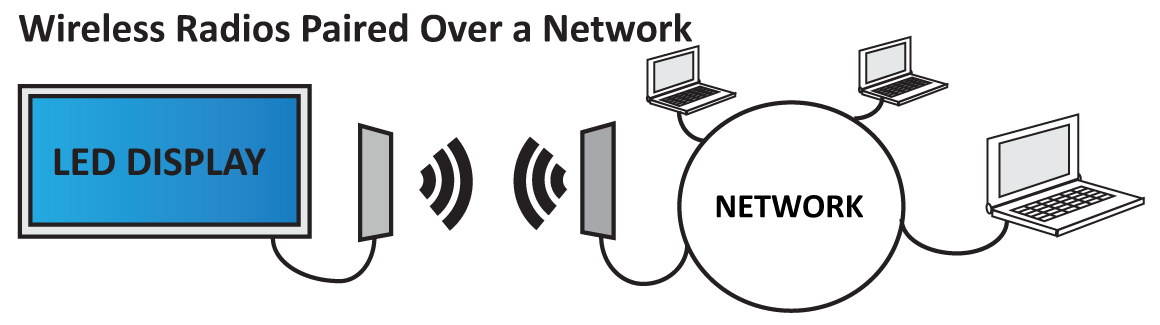
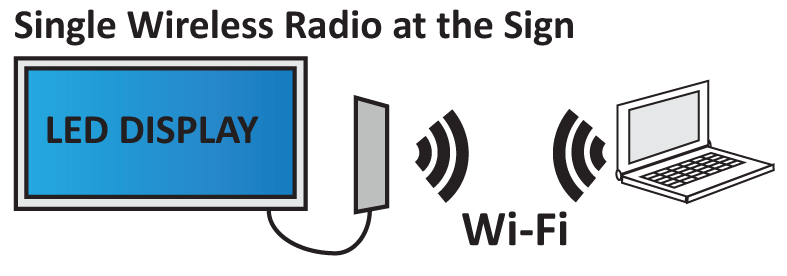
Most signs are supplied with 2 wireless devices. One unit connects and resides at the sign, the other at the building connected to the users network or computer directly. (In some applications, only one radio is used)


These radios communicate to each other and create a “wireless cable” from the building to the sign, allowing end users to manage their sign without having to run an actual cable out to the sign. These radios can use a variety of frequencies and security methods to connect the sign to the end user.

Frequencies
  • 900 MHz: This has been used for many years in wireless communications between devices. Many traffic devices and networks use this frequency because of its range. However, it has a much smaller bandwidth capacity than the other options so most new LED signs do not use this anymore.
  • 2.4 GHz: This is the most common wireless frequency in use today. Most home networks use this frequency for their “WiFi” connections. Most laptops have a 2.4 Ghz WiFi card built in.
  • 5 GHz: This is gaining popularity, but is still much less common than 2.4 Ghz. This uses some of the same “WiFi” standards as 2.4 Ghz, but is inherently more secure because it is less common. In my opinion, this is the best frequency to use because it mixes the speed of 2.4 Ghz with the security of 900 Mhz.
Wireless Security
WiFi security has greatly improved over the years. Encryption and password based security is much better and easier to set up than ever before...but only if you actually use it. Here are some things to remember:

  • Factory Settings: A good manufacturer will change the factory settings on the wireless devices to it’s own secure settings. These should not be published in any public documentation, but only available to the end user and/or sign dealer supporting the signs. Part of the reason we saw those “Zombies Ahead” signs a couple of years ago was due to unchanged factory settings (See Deacons Post). As an extra precaution you can always set your own security settings for the radios, but remember to document these changes. You could get in a bad situation if your computer crashes and you have to re-enter the settings.
  • Quality Devices: Make sure your manufacturer uses established, well tested wireless products. You do not want your sign using a sub-par device with weak encryption and security options.

Software Security
A well designed LED sign system will also incorporate direct and indirect software security as an additional firewall to intruders.
  • Not Publicly Available: Avoid software that is available for public download. The only people who should have access to the sign software is the dealers and the end-users.
  • Secured Installations: Installations should be secured with an “Activation Code” or other security system to prohibit unauthorized parties from installing copies of the software. Avoid unsecured or generic software.
  • Cloud Based Options: This is a new concept in the LED Sign market, but there are options currently available. Internet based sign management can be another way to secure all your content because you can rely on enterprise level security and off-site hosting. This makes it much harder for anyone to do any real damage to the sign with local access.
Network Security
This is another key point to ensure protection. Your network should be reasonably secure and access restricted to your own personnel only.  
  • Secure your Computers: All of your computers should be password secured. Most windows based systems allow you to require a password to log into the system after the computer goes into the “Screen Saver” or “Sleep” mode.
  • Physical Access: Make sure you install the sign software only on the computers you have direct control over, and who’s users you trust. An extra security measure can be to have a dedicated laptop that is on it’s own network, connected directly to the sign using the wireless radios.
Wireless security is important for LED signs. Make sure your manufacturer is using quality hardware and unique wireless settings to avoid a “Zombie Warning” situation. Your own network should be secured with common sense security practices like passwords and restricted access. Your manufacturer or dealer should be well versed enough in the unique security needs for LED signs to help guide you in the best options for your specific installation. An LED sign is a large investment, make sure the security, options, and hardware quality reflect this.

-SH


I hope this post has been informative and helpful. As usual, I welcome ALL constructive comments. Please feel free to comment and add anything I’ve missed, or additional tips you may have regarding this topic. Please visit www.vantageled.com for many other resources, white papers, and of course: Great looking LED Signs!

**All posts/thoughts/writings are strictly the viewpoint of me and me alone and do not reflect nor speak for Vantage LED’s beliefs, attitudes, thoughts, etc. unless specifically stated.

Thursday, September 27, 2012

Communication Methods for LED Signs / Electronic Message Centers: Wireless, Hard Wired, or Both?


LED Signs communicate information to the public, but how do you decide the best way to communicate to the sign? There are many ways to do this and each option has its own pros and cons, depending on your specific installation type.

There are (3) types of approaches to communication: wired, wireless, or both. Some locations have existing hard wiring to the sign site, others are more remote and using a cellular modem is the only realistic option.


WIRED (HARD LINE)   
  
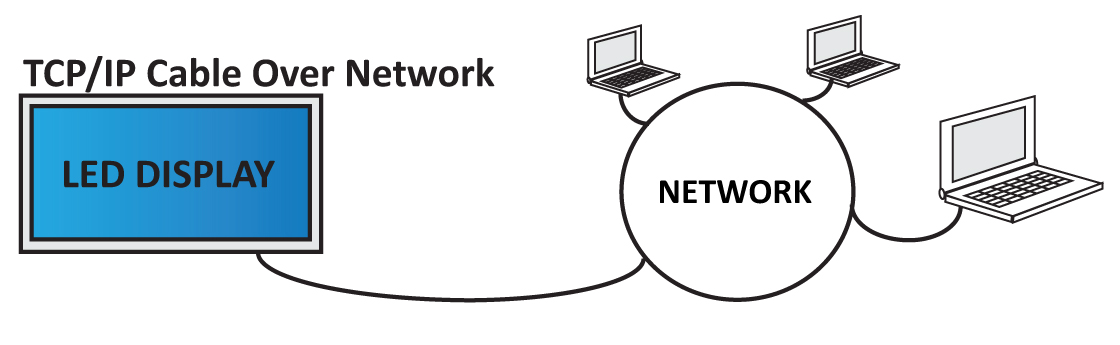
In the past, before high speed networks were common, LED signs were usually hardwired using a phone modem or serial cable (RS485 or RS232). These options were fine back then, because the signs were less sophisticated and the actual data sent to the sign was minimal. As LED sign technology expanded, larger file sizes were required. These options became less common and were replaced by standard Ethernet network cable or Fiber Optics. The older options are still used in special situations like factory production floors where they have a large serial network with simple machine code, but for the commercial market Ethernet and Fiber have become the standard wired solution.


Ethernet TCP/IP  (Cat5/6 Cable - RJ45 Ends)

 
This is a common option for wall mounted signs, or street signs that are closer to the building or network drop, where the cable run is less than 300 Ft. Most LED sign manufacturers offer this connectivity imbedded into their system without any special adapters. Signs that require separate “Ethernet Adapters” may be using older Serial based controllers.

  • Maximum run is 300ft without a network switch in the middle to boost the signal.
  • Less fragile than Fiber Optics. Harder to damage.
  • Ethernet networks are very common, and the cable is inexpensive.


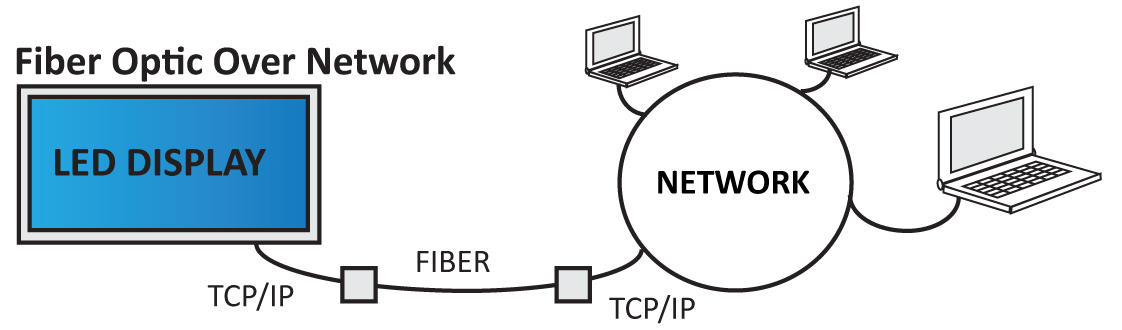
Fiber Optic Cable

 
Although somewhat rare in commercial LED sign installation, Fiber is still commonly used in the military. Data is sent using light signals across refined glass strands that make up the fiber optic cable. An “Fiber Optic to Ethernet” converter is usually required on both sides of the system: one placed at the sign, and the other at the building where it connects to the main Ethernet network.

  • Long distance capability near 40 miles with Single-Mode (more expensive), and 10 miles using Multi-Mode (less expensive).
  • Fragile, and can be expensive to run and repair if damaged.


WIRELESS
  
You can get Wireless Radios that connect to serial networks, cellular networks, and standard Ethernet TCP/IP networks. Many frequency standards can be used, but the most common ranges are 900 Mhz, 2.4 Ghz, 5 Ghz and Cellular. Wireless radios have become the standard option for most manufacturers because they allow for a broad range of installation types, and can save time and money by not having to run a hard line in the ground.

Wireless is best when you have an LED sign that will be within 100-200 yards of the transmission point with clear “Line of Site” (no buildings or metal walls between the radios). The most common configuration  is (1) wireless radio installed at the sign, and (1) at the building. You connect the building radio to your network, or computer directly and the radios function as a long wireless “cable” connecting you to the sign. Other configurations can be used depending on the installation like Point to Multipoint, WiFi Access Point, and others.  


Common Frequency Types:

900 Mhz (slower data rate, longer distance): These were much more common in the past, when serial networks abundant. However, there are products out there that will use a multi channel 900 Mhz signal with a standard ethernet network to boost the data rate. These radios are best used for installation with special needs like distance or if the signal needs to go through structures between the sign and the transmission point.

2.4 Ghz (standard WiFi frequency): These radios are the most common, and have a good balance of distance and data rate. 2.4 Ghz is the most used frequency in the USA for home and commercial WiFi networks. This poses a slightly larger security risk for your sign, if the radios are not secured properly. (Deacon’s post on LED sign security)

5 Ghz (higher data rate, more secure): This frequency is less common than 2.4 Ghz, making it a bit more secure because most hackers are not looking for signals in the 5 Ghz range. You also avoid possible interference from other 2.4 Ghz devices in the area. Many manufacturers are leaning toward this option as the default choice for LED signs.

Cellular Modem

Another wireless option is a Cellular Modem. These are gaining popularity, but are less commonly used for LED signs. They provide access to the sign over the same data network as your smart phone (3g, 4g, LTE, etc..). Without getting too technical, the system works like this:

After purchasing a “Data Only” monthly plan through a wireless carrier supported by the Cell Modem (ATT, Verizon, T-Mobile, Sprint),  the wireless provider will then provide an external internet IP address for the Cell Modem to use. The Cell Modem is installed and connected to the sign (likely using a secured router). You can then send messages to the sign over the internet by using the unique IP address previously provided.

This option is best used for signs that are controlled off-site, in remote locations, or outdoor digital billboards.


WIRELESS AND HARD LINE

I’ve been on installations who utilize both options as a fail-safe measure when the sign is providing mission critical data. This is more common in a military setting, but I’ve seen schools and other government organizations use this approach. For the average user, I believe it’s overkill, but if you do decide to take this route make sure you communicate this to the manufacturer. Some manufacturers will need to put an extra “Network Switch” inside the sign, and this can be an extra fail point. Others will have multiple network ports built into their sign control unit, a much better solution in my opinion.


Conclusion

The bottom line is, make sure you work with the manufacturer or LED sign dealer to get the best solution for your installation. Not being able to communicate with your brand new sign because the communication method is in-correct can really ruin the excitement of the moment. If your manufacturer doesn’t pre-program street ready messages on the sign, you may be stuck with “Sign Test 3” scrolling across the sign until the communication is fixed.

Make sure your manufacturer secures the wireless devices prior to shipment, and allows you to configure them with your own security measures if needed. Communication to your sign is a fundamental necessity, make sure you get the best solution and equipment from your manufacturer.


-Scott Hofheins


I hope this post has been informative and helpful. As usual, I welcome ALL constructive comments. Please feel free to comment and add anything I’ve missed, or additional tips you may have regarding this topic. Please visit www.vantageled.com for many other resources, white papers, and of course: Great looking LED Signs!

**All posts/thoughts/writings are strictly the viewpoint of me and me alone and do not reflect nor speak for Vantage LED’s beliefs, attitudes, thoughts, etc. unless specifically stated.