Showing posts with label networking. Show all posts

Wednesday, March 12, 2014

Digital Signage Need To Know: LED Display Evolution


There is little doubt that the modern outdoor LED display is a cost-effective advertising machine. 

With a very low cost-per-exposure for your advertising message, and 24/7/365 functioning there’s no worry about this employee updating their Facebook page instead of doing the job assigned. 

Not only cost-effective, it is also willing to do what you tell it, when you tell it, and for as long as you’d like. If you want a new slide to advertise your Easter Egg hunt at the church, type your slide description request in and soon the glitzy piece of artwork has automatically been produced by a professional designer and downloaded into the LED display's ad rotation. Not every LED display can do this function, so do your homework and determine what your business needs and where to find these professionally produced slides.

LED displays are becoming smarter and the mystery of the control software is dissolving as leading manufacturers build user-friendly platforms and interfaces. Perhaps someday, you may even go to your local Sam’s or Costco and buy a “plug and play” LED display not unlike a 60” Samsung TV. There are market forces commoditizing everything!

Ah yes, we live in a marvelous age of advanced technology being focused on outdoor signs. But it hasn’t always been that way. How and from where did today’s signs come to be?

There may have been some industrious cave dwellers scratching images into cave walls, to document and tell stories but these efforts are not generally considered to be the first signs. Most historians date the beginning of signs well past Fred Flintstone and Barney Rubble into the Greek and Roman era.

Stone and terra-cotta symbols and drawings were used since most of the world was illiterate. Perhaps these early sign builders were visionary as LED displays today seem to “say it” more in pictures than in words. Pictures capture the imagination and communicate ideas as well, if not better than, text- words. A symbol for a tavern, for example, communicated the idea to all.


Here is an example of what appears to be a tile sign, early Roman- a warning that the owner of the home had guard dogs. It is simple and effective.

Religious groups used the symbol of the cross, and tradesmen used their sign symbols to advertise their specialty.

As time marched on the use of symbol signs became law. In the late 1300’s a law was passed that any tavern selling ale “must” have a symbol sign. Meanwhile those “trade signs” became more ornate and unique and featured logos of dragons and lions as business identities were established.

With the onset of the 19th century (1800s) the world’s advancing technology began to shape the sign industry. The invention of the printing press established the course centuries earlier but the advent of the industrial printing press, the innovations that expanded the print area and drove the printed output to thousands of pages per hour. This was a step towards the modern sign industry of today.

The excitement of the modern sign industry did not begin until the widespread use of electricity became common place. The incandescent bulb was the backbone of the new trendy signs and designers made the best use of them.

Neon signs followed the incandescent bulb era (1910- Paris Motor Show) and glass blowers and artists began to produce not only messages but works of art. But a neon sign is unchangeable and permanent. 

In the mid to late 40s, technology again changed the sign industry with the introduction of plastics which included the changeable letter signs. Flexibility and messaging was improving.

In 1962 Nick Holonvack, Jr. of GE, developed the first red LED lamp that produced light in the visible spectrum and the race towards todays LED sign industry began.

The LED displays we see today evolved from simpler designs of the 1990s.The early LED sign industry began to gain prominence and traction in large-scale sporting venues and other commercial applications. Las Vegas and Times Square became the glowing beacons for what technology could develop.

Today, as software evolves, animation, live video and other “mind-blowing” graphics have transformed both the digital billboard industry and the on-premises signs (smaller than the billboards and owned by the resident business).

The sign industry of today produces about $50 billion dollars a year in sales. Digital signs have driven much of the excitement and the sales within the sign industry and it’s only expected to get better. 

One could say… our future's so bright… we gotta wear shades! I'm sorry, I couldn't resist!

These comments are my personal perspective and do not reflect the opinion of Vantage LED, Inc. or SignVine, Inc. or any other person or organization. If you have constructive feedback please email me at                                                          michael@signvine.org.
                                               
                                                    -- Mike Prongue


Friday, September 27, 2013

Digital Signage How To: Networking Basics


-Scott Hofheins


The invention of the computer changed the way we see and interact with the world forever. Likewise, networking these computers together changed their very definition. It lets them work together like a single organism powering the internet, cloud applications, email, commerce, Youtube, Google...you name it.


The sign industry is no exception. We’ve gone from basic serial communication, to high speed 4G Cellular modems on full color digital billboard networks. Knowing how computers and networks function, even on a basic level is a worthwhile goal for anyone in the industry. My intention is to keep this as simple as possible, while still providing an accurate picture of how it all works.


Network Neighborhood
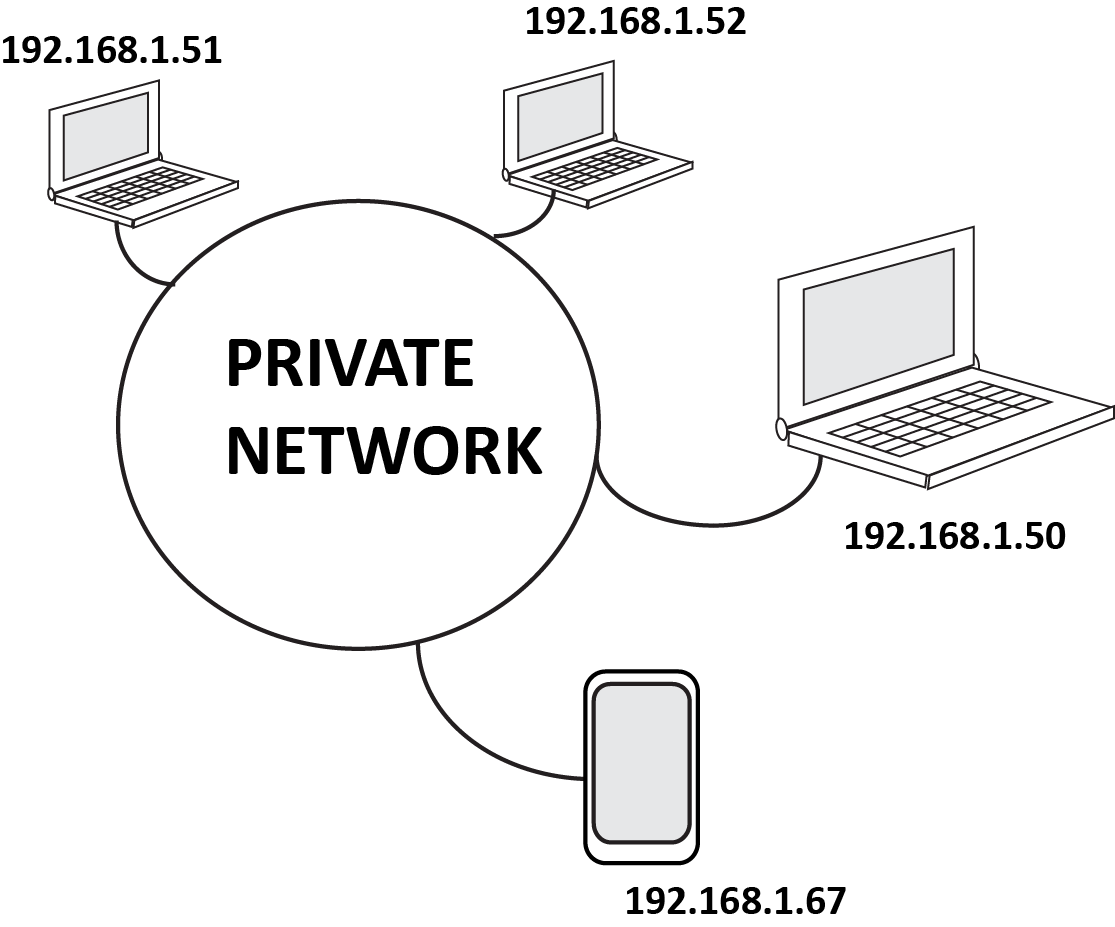
These days a computer can be anything: cellphones, laptops, desktops, signs, even cars! Networks are a collection of these devices organized into virtual neighborhoods in a virtual world. Just like us, these devices share information, maintain their ‘home’, and communicate with others across the globe. They have laws and standards that they must abide by, or the system can break. We call the most fundamental law TCP/IP and is the final word in whether or not devices can communicate with the others.


Addresses
Just like your house, these devices must have registered addresses according to TCP/IP rules. The address and other settings will look something like this:

  • IP Address: 192.168.1.50 (your actual address)
  • Subnet: 255.255.255.0 (the limitations of your address)
  • Gateway: 192.168.1.1 (the address of the gateway to the internet)
  • DNS #1: 192.168.1.1 (the address of your phone book)
  • DNS #2: 8.8.8.8 (your backup phonebook)
Because everything is automated in this virtual world, devices cannot communicate over the network without an address. The mail man might show up, but if there is no number on a house he will run away confused, and usually drop your packet in the process. He doesn't even knock on the door.


Organization and Keeping the Peace
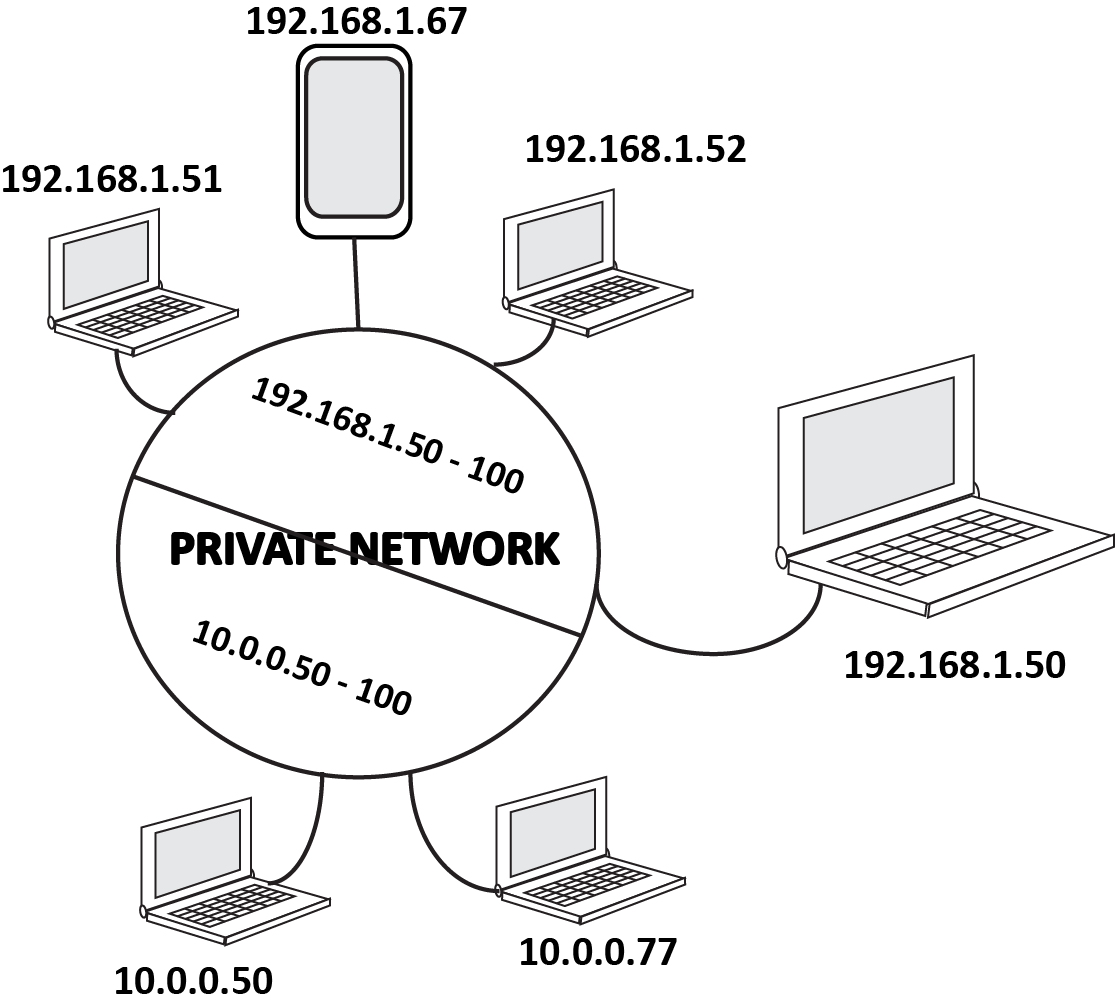
To avoid miscommunication and provide standard design structures for our private networks, TCP/IP tells us that our devices cannot communicate with another device unless it they both have addresses within a designated range. This is important for security and organization. You may not want the Hatfield area talking to the McCoys, it could get ugly. So you setup your Hatfield devices on a range of 192.168.1.50 thru 100, and your Mccoys on a range of 10.0.0.50 thru 10.0.0.100. This way, they still live in the same network without causing any issues.


Public and Private
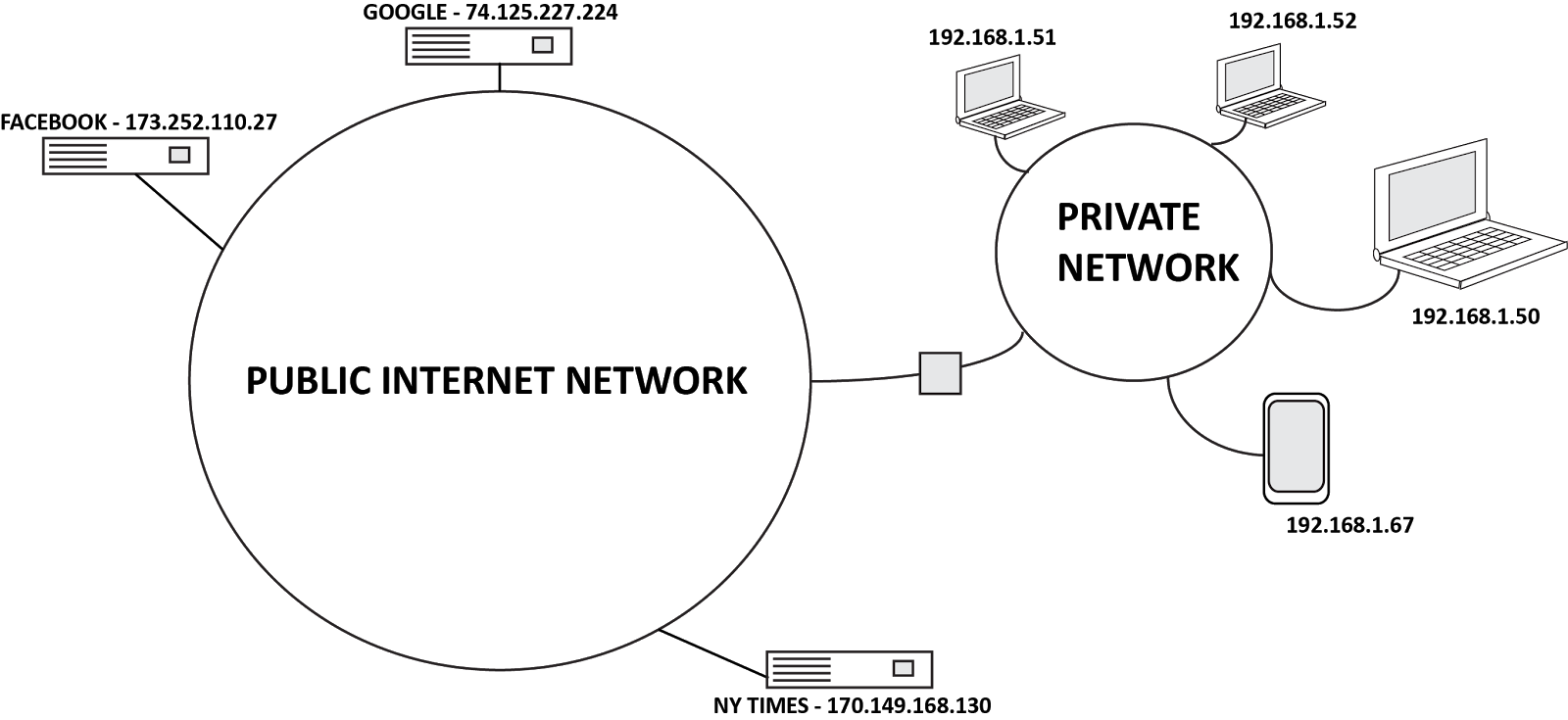
Because this entire virtual world is governed by a strict numerical government, there is a limited number of addresses available. To minimize this problem, they have separated the world into Private Networks, and Public Networks. Private Networks have a smaller number of addresses they can use legally, at their leisure.  The Public Network has all the rest of the addresses, governed by the almighty ICANN. They keep a record of all public addresses and who they are assigned too. All communication between Private and Public networks rely on this record.


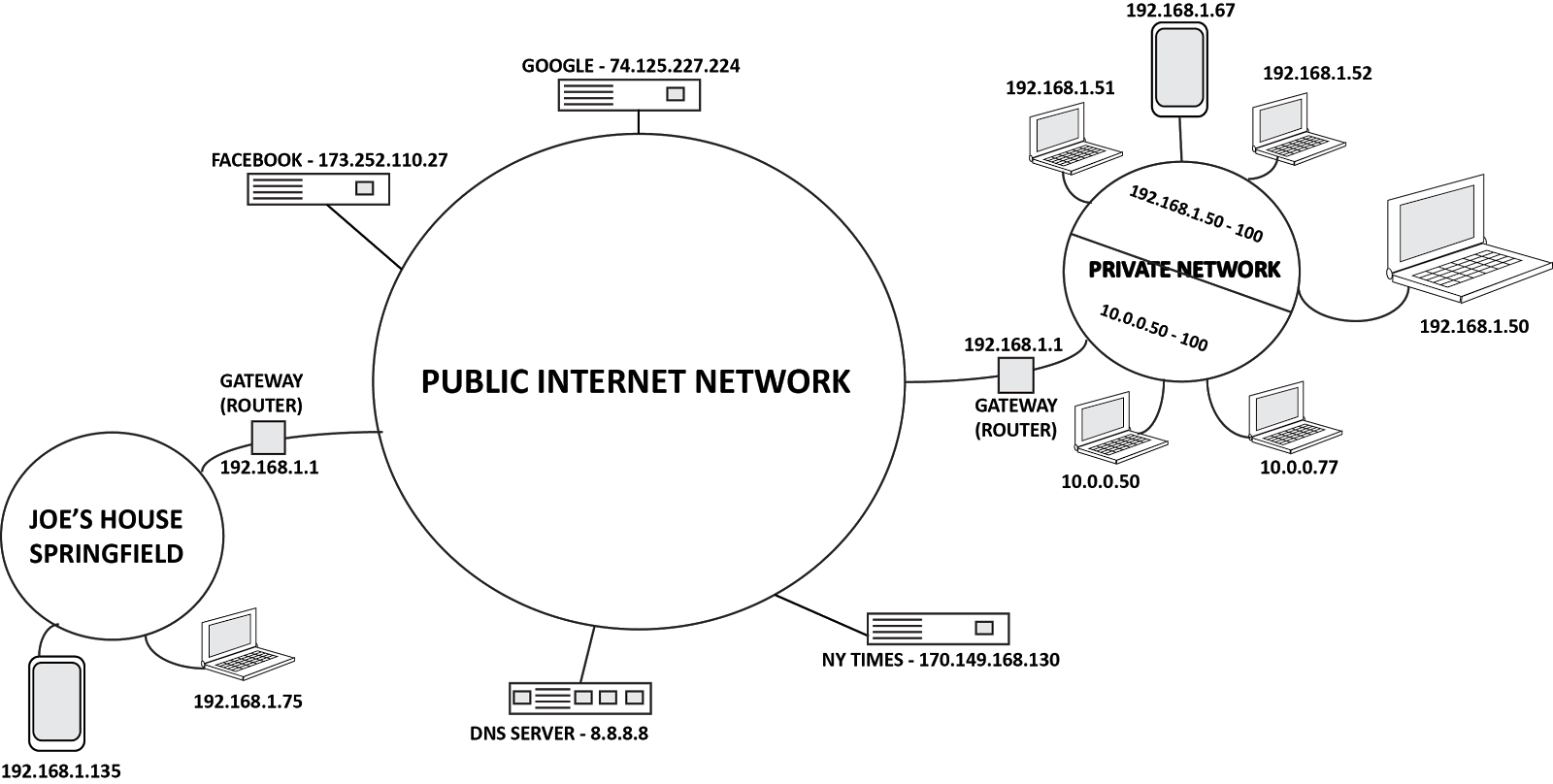
Private address numbers can be duplicated, as long as the duplicate numbers aren't in the same network. The mail labeled 1600 Pennsylvania in Springfield MO, will not go to the White House at 1600 Pennsylvania in Washington DC because they are in different "neighborhood". This is why it’s important that Public Addresses cannot be duplicated number for number, because they are in a single neighborhood we call “The Internet”.


Gated Communities
So how do we communicate with the public addresses like Google, or Facebook? Or across the internet, to email our grandma? Well it’s all about The Gateway. Every private network that wants to communicate to the outside world (or in some cases a larger internal network) must have a Gateway to these places. This is a device like a router, that will direct your devices communications back and forth correctly, over the internet. In other words, the gateway is the device that labels your communication for 1600 Penn in Springfield, MO...not Washington DC.

The Phone Book
Numbers are great, but not so easy to remember. You really don’t want to have to type in 74.125.227.224 to get to Google right? So we have DNS, or Domain Name Servers. These devices keep track of who’s name, is associated with what number. So when you type google.com, the DNS server looks up the number for that name, and sends you to the right place. Usually your Gateway (Router) will communicate directly with the DNS servers online, (this is why in a typical home network your Gateway address and DNS address are the same).


The Basics
It seems complicated at first, but when you really lay it out and look at the basics, it starts to make sense. Just remember these key points.
  • Every device must have an IP address to access the network.
  • To communicate with other devices, the addresses for each device must be in the same range.
  • Devices access the internet through a Gateway. If you do not provide a Gateway address for the device, it can still communicate to your private network, but no further.
  • The DNS server is your phone book, it looks up the numerical IP address associated with the name you typed into the browser and sends you to the right place.
-SH


I hope this post has been informative and helpful. As usual, I welcome ALL constructive comments. Please feel free to comment and add anything I’ve missed, or additional tips you may have regarding this topic. Please visit www.vantageled.com for many other resources, white papers, and of course: Great looking LED Signs!


**All posts/thoughts/writings are strictly the viewpoint of me and me alone and do not reflect nor speak for Vantage LED’s beliefs, attitudes, thoughts, etc. unless specifically stated.